








【日本語に変換】ワードプレスでパスワード保護を記事の途中に置く方法 プラグイン「Passster」

ワードプレスの記事の途中にパスワード保護を置く方法をご紹介いたします。
今回はプラグインを使用、改変していきます。
使用するプラグインは「Passster」です。
インストールまではほかのサイトでも紹介されているので割愛します。
プラグインを有効にし、
パスワードをかけたい箇所にショートコードを入力します。
[passsterr password=”任意のパス”]内容[/passster]
そうするとパワードを入力する箇所と認証のボタンが出てきます。

英語になっていますね。
こちらを日本語に変換していきます。
↓↓↓↓↓↓↓↓↓↓↓↓↓↓↓↓↓↓↓↓↓
2段目「This content is password-protected. Please verify with a password to unlock the content.」
↓↓↓↓↓↓↓↓↓↓↓↓↓↓↓↓↓↓↓↓↓
入力箇所
どこで紐づいているか分からないので、全て変更をしたほうがいいと思います。
実際変更して稼働をさせていますが、今のところ問題ありませんので、日本語に変更したい場合は参考にしてください!
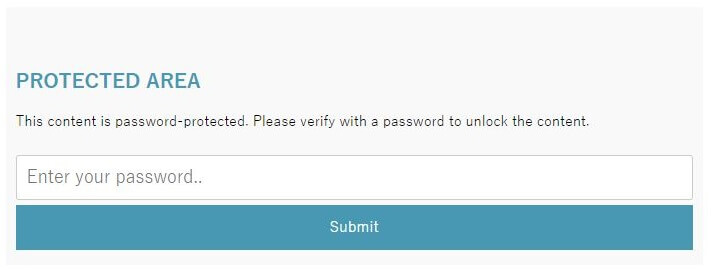
英語になっていますね。
こちらを日本語に変換していきます。
目次
「Passster」を日本語
「ドメイン/wp-content/plugin/content-protector/src/admin/class-ps-customizer.php」
タイトル部分から「Protected Area」93行目 /* instructions headline */ $wp_customize->add_setting( 'passster_form_instructions_headline', array( 'default' => __( 'Protected Area', 'content-protector' ), ) );
↓↓↓↓↓↓↓↓↓↓↓↓↓↓↓↓↓↓↓↓↓
/* instructions headline */
		$wp_customize->add_setting( 'passster_form_instructions_headline', array(
			'default' => __( 'パスワードで保護しています。', 'content-protector' ),
		) );
2段目「This content is password-protected. Please verify with a password to unlock the content.」
153行目
/* instructions text */
		$wp_customize->add_setting( 'passster_form_instructions_text', array(
			'default' => __( 'This content is password-protected. Please verify with a password to unlock the content.', 'content-protector' ),
		) );
↓↓↓↓↓↓↓↓↓↓↓↓↓↓↓↓↓↓↓↓↓
/* instructions text */
		$wp_customize->add_setting( 'passster_form_instructions_text', array(
			'default' => __( '下の部分パスワードを入力してくだい。', 'content-protector' ),
		) );
入力箇所
142行目
/* placeholder text */
		$wp_customize->add_setting( 'passster_form_instructions_placeholder', array(
			'default' => __( 'パスワードを入力', 'content-protector' ),
		) );
エラーメッセージ 2か所
221行目
/* error message text */
		$wp_customize->add_setting( 'passster_form_error_message_text', array(
			'default' => __( '認証パスワードが違います。', 'content-protector' ),
		) );
「ドメイン/wp-content/plugin/content-protector/src/admin/class-ps-shortcode.php」
38行目あたり
/* user input */
        $output = $content;
        $wrong_password = apply_filters( 'passster_error_message', '' . get_theme_mod( 'passster_form_error_message_text', __( '認証パスワードが違います。もう一度お試しください。', 'content-protector' ) ) . '' );
        /* api */
「ドメイン/wp-content/plugin/content-protector/src/admin/content-protector/src/class-ps-form.php」
コチラも変更 2か所 認証、パスワード29行目あたり '[PASSSTER_BUTTON_LABEL]' => get_theme_mod( 'passster_form_button_label', __( '認証', 'content-protector' ) ), '[PASSSTER_PLACEHOLDER]' => get_theme_mod( 'passster_form_instructions_placeholder', __( 'パスワードを入力', 'content-protector' ) ),
どこで紐づいているか分からないので、全て変更をしたほうがいいと思います。
実際変更して稼働をさせていますが、今のところ問題ありませんので、日本語に変更したい場合は参考にしてください!


